

The Accountability Engine for Email
Email is where work is discussed.InBoard is where accountability is remembered.
InBoard continuously tracks commitments, ownership, deadlines, and waiting status across your email, so important work never quietly slips through the cracks.
No spam. We'll only email when access is available.
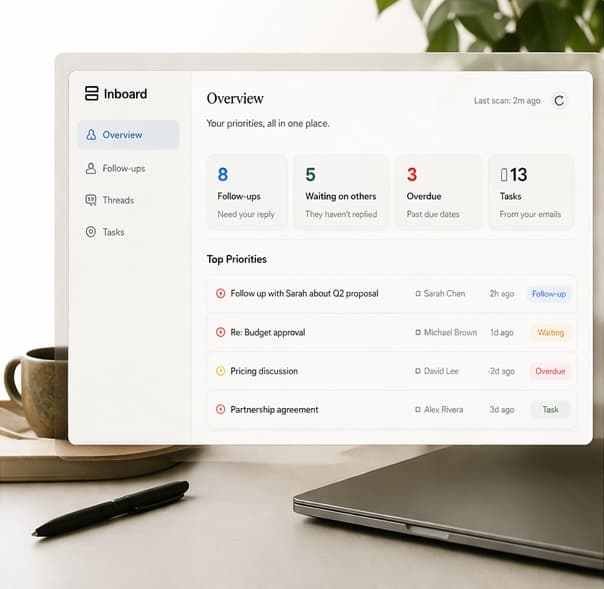

Join the waitlist
For professionals who cannot afford to drop a commitment.
We're opening access in small groups. Join the list and we'll email you when it's your turn.
No spam. We'll only email when access is available.
Email remembers conversations.Your work depends on commitments.
Ordinary emails hold pieces of ongoing work. Someone writes, "I'll send the proposal." Another asks, "Can you review this?" A thread closes with, "Let's reconnect next week," or pauses on, "We're waiting on legal."
Email stores those lines as messages. In reality, they are commitments with owners, timing, and waiting states that remain active long after a message is read or buried. As replies arrive, ownership shifts, deadlines move, and work eventually closes.
Every email updates your accountability record.
Every relevant email creates or updates a commitment. Ownership, deadlines, waiting status, and risk change automatically as conversations continue.
- 1
Email arrives
A new message enters a conversation where work is being discussed.
- 2
Commitment detected
InBoard identifies the obligation inside the exchange.
- 3
Owner identified
Responsibility is assigned to whoever owes the next move.
- 4
Deadline understood
Timing and urgency are captured when they appear.
- 5
Waiting status updated
The record reflects whether work is yours, theirs, or in progress.
- 6
Dashboard and briefing update
Your views refresh around what still needs to happen.
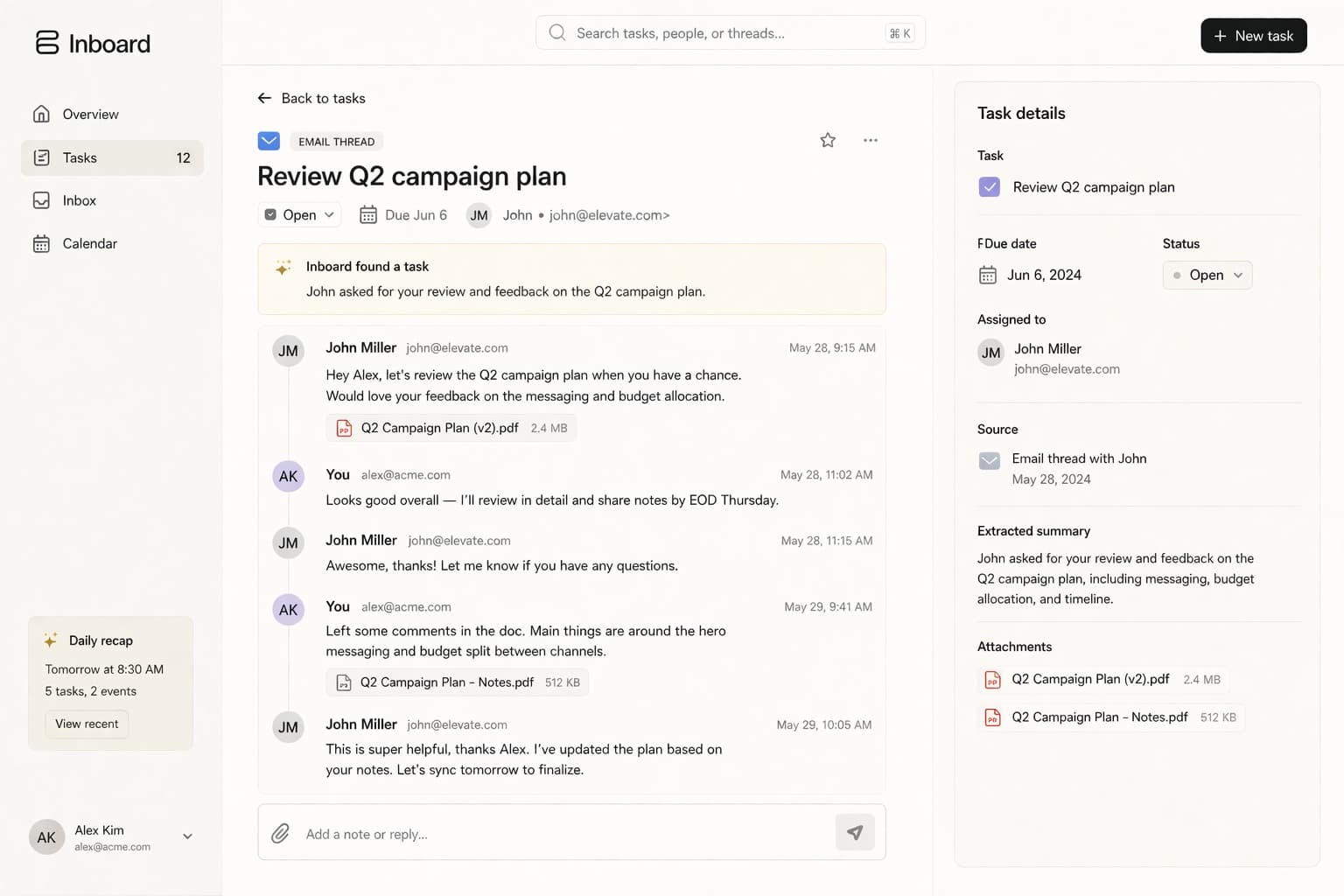
One commitment. Four emails.
InBoard keeps the same commitment current as ownership, status, and completion change across the conversation.
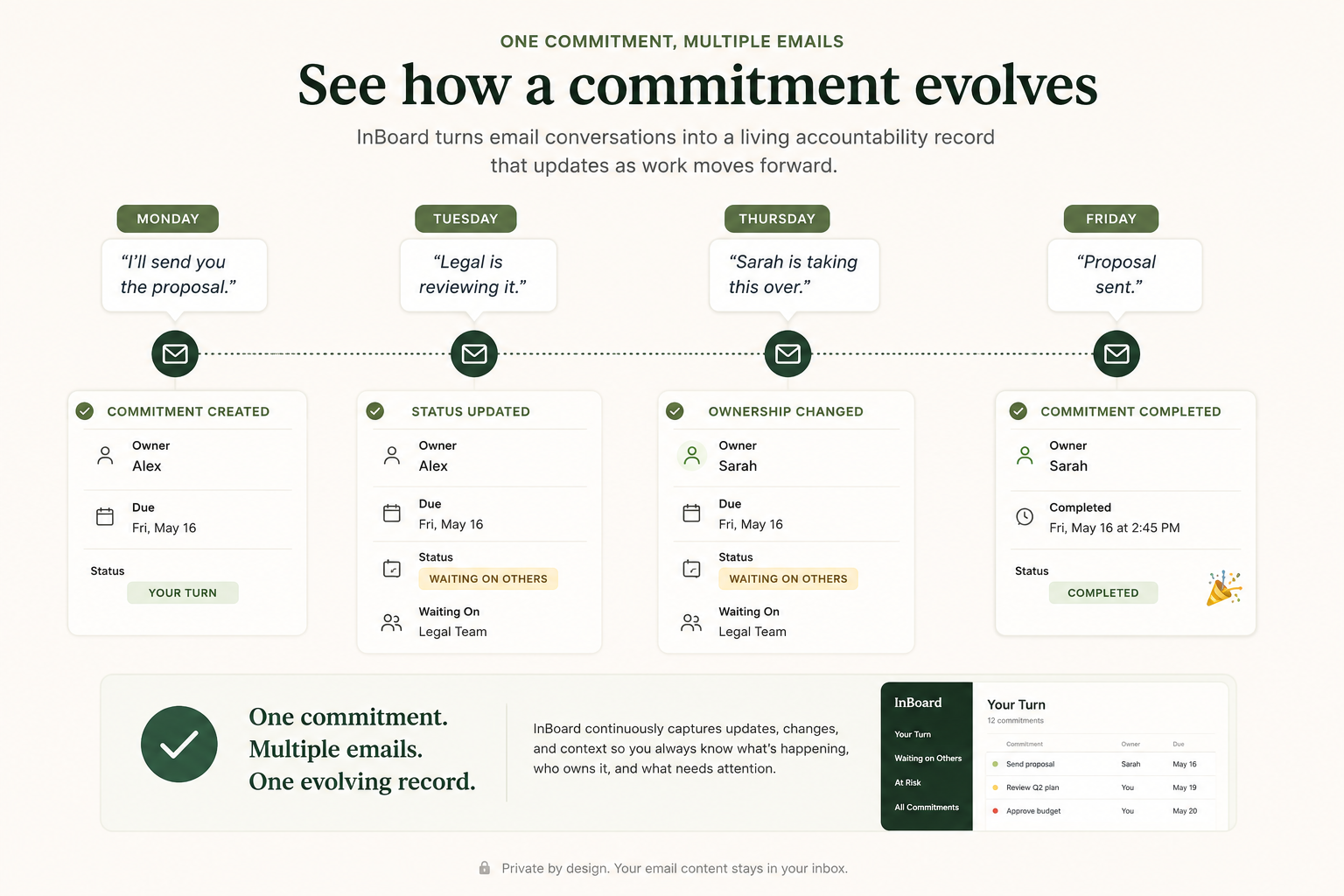
Emails come and go.Commitments evolve.InBoard remembers.
Your work, organized automatically.
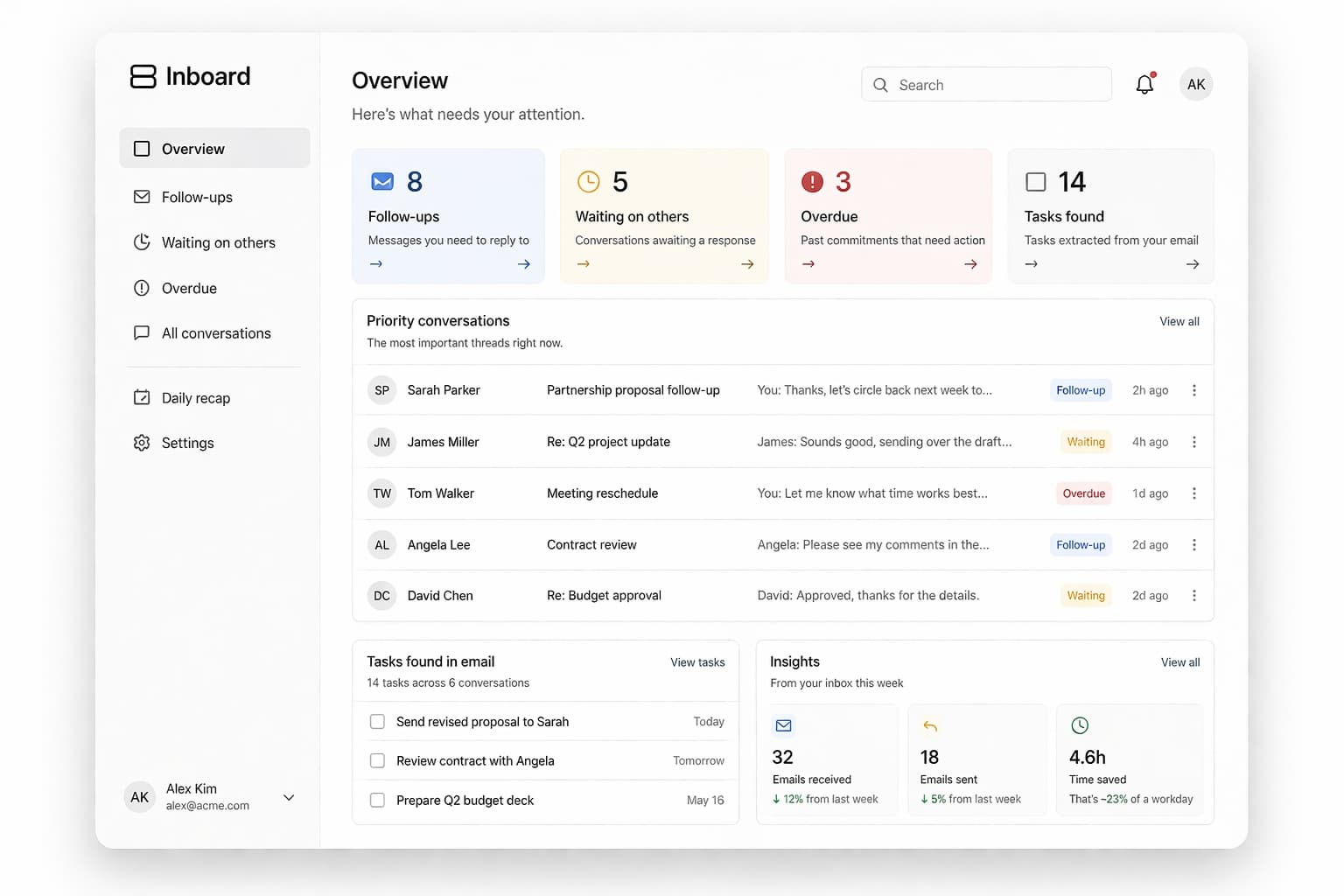
InBoard automatically organizes what you owe, what others owe you, what is at risk, and what changed since yesterday. No manual task list required.
Your Turn
Commitments where the next move is yours.
Waiting on Others
Obligations others owe you while the ball is in their court.
At Risk
Work where delay, silence, or a slipping deadline needs attention.
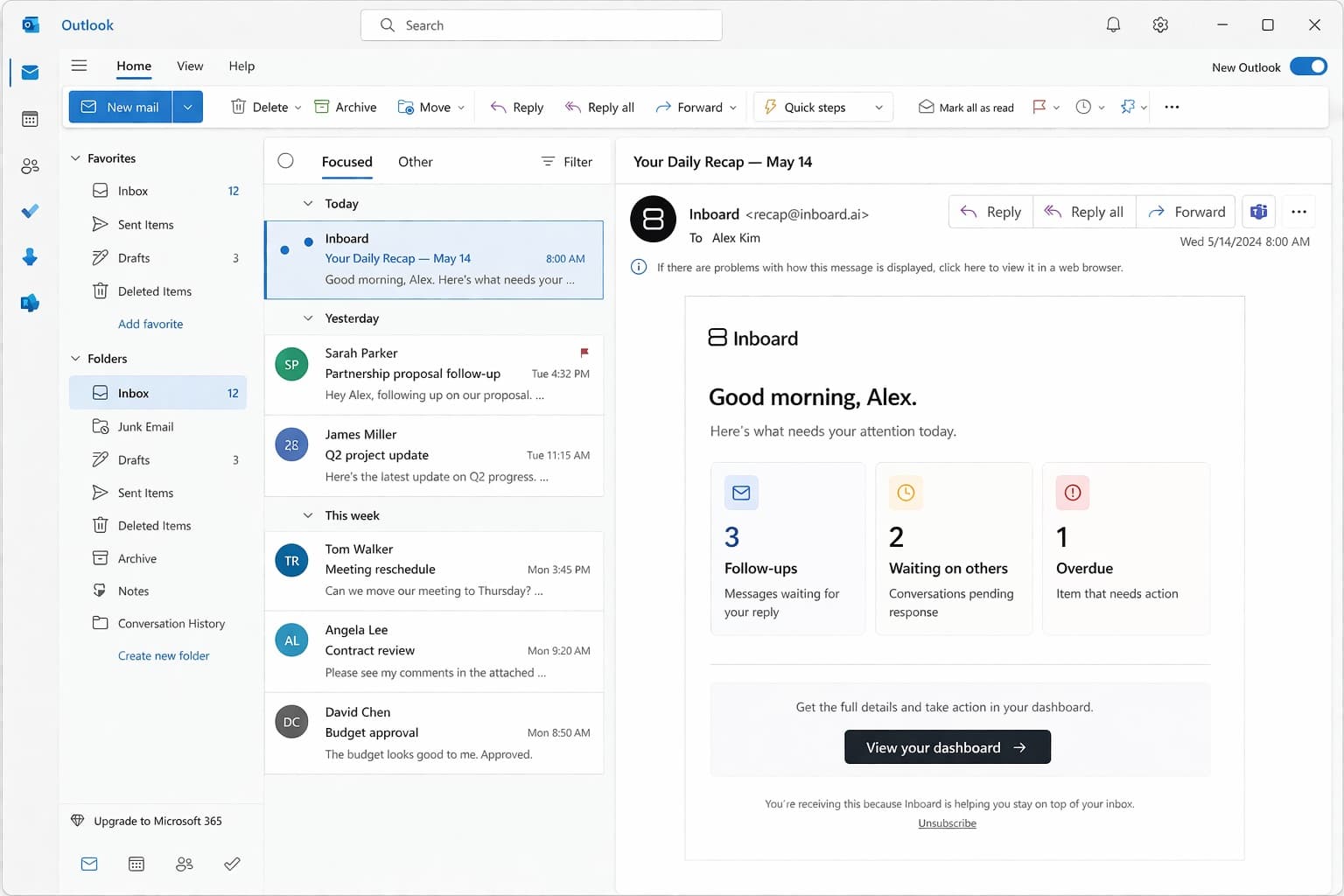
Daily Accountability Briefing
A short morning email showing what changed and what matters first.
AI assistants understand conversations.InBoard understands accountability.
AI assistants help you understand what was said. InBoard remembers what still needs to happen.
AI email assistants
- Summarize threads
- Draft responses
- Answer questions about current context
- Work from the conversation in front of you
- Help explain what was said
InBoard
- Tracks commitments
- Identifies ownership
- Maintains status over time
- Notices when responsibility or risk changes
- Remembers what still needs to happen
Your inbox changes every minute.Accountability compounds over time.
Every reply can create a commitment, change ownership, shift a deadline, or close the loop. Instead of starting over with every prompt, InBoard continuously updates the same accountability record as conversations evolve.
Your Accountability Dashboard
See what you owe, what others owe you, what is at risk, and what needs your attention now.
- What do I owe?
- What do others owe me?
- What is at risk?
- What needs my attention now?
Pricing
Less than the cost of one dropped commitment.
Full access during your trial. Cancel anytime.
$19/ mo
per month, billed monthly.
- 14-day free trial on your real inbox
- No credit card required
- Cancel anytime
- Full accountability for email, one plan, no tiers
Frequently asked questions
What is InBoard?
InBoard is the Accountability Engine for Email. It tracks commitments across email, including ownership, deadlines, waiting status, risk, and completion. The dashboard and daily briefing are outputs of that record. InBoard is not another inbox, CRM, AI writing assistant, or manual task manager.
How is InBoard different from an AI email assistant?
AI email assistants summarize threads, draft responses, and answer questions from the current conversation. InBoard tracks commitments over time: ownership, status, risk, and what still needs to happen after the thread moves on.
Is InBoard another task manager?
No. Task managers depend on you to create and update another list. InBoard updates the accountability record from your email activity.
Does InBoard replace my inbox?
No. You keep using Gmail or Microsoft 365 / Outlook. InBoard connects to the mailbox you already have.
What does InBoard track?
Commitments and the state around them: ownership, deadlines, waiting status, urgency or risk, and completion or closure.
How does the daily briefing work?
It is a short morning email from your accountability record covering what needs you, what you are waiting on, what is at risk, and what deserves attention first. It is an accountability briefing, not an inbox summary.
Do I have to manually maintain a list?
No. Commitments and their status update as relevant email arrives. You review and act from the dashboard and briefing.
Does InBoard work with my email?
Yes. InBoard connects to Gmail and Microsoft 365 / Outlook with secure sign-in. You keep using the same inbox.
How secure is InBoard?
InBoard uses secure authentication and token-based access to connect to your email. Content is processed over encrypted connections, and access is limited to the minimum permissions needed to show accountability signals. Credentials are never stored in plain text.
Is InBoard available yet?
InBoard is currently in early release. Joining the waitlist provides early access as new users are onboarded.
Work should not disappear because an email got buried.
InBoard remembers the commitments inside your email, so the work that still matters stays visible.